Working on a laptop for several hours can become uncomfortable when the screen sits far below a natural viewing height. A well-designed laptop stand raises the display, creates a cleaner workstation, and can make it easier to arrange your screen, keyboard, and mouse in a comfortable position. The right stand can also improve airflow around the computer while freeing useful desk space.
The best laptop stands for better ergonomics come in several styles. Fixed aluminum stands offer excellent stability for permanent desks, while adjustable models let you change screen height and angle. Lightweight folding stands are useful for remote workers and travelers who need a more comfortable workstation in cafés, coworking spaces, hotel rooms, or temporary offices.
Choosing the right stand depends on your laptop size, desk setup, work habits, and how often you move between locations. Stability, adjustment range, portability, ventilation, and compatibility matter more than appearance alone. The options below cover different working styles while helping you build a more comfortable and practical laptop workstation.
What to Look for in an Ergonomic Laptop Stand
Height adjustment should be one of your first considerations. A useful stand raises the laptop screen enough that you can look forward more naturally instead of constantly bending your neck downward. Adjustable stands provide more flexibility for different desk heights and users, while fixed models work well when their preset height already matches your chair and workstation.
Stability matters just as much because a laptop that shakes while typing or during video calls becomes distracting. Wider bases and solid aluminum construction usually feel more planted on permanent desks, while folding travel stands rely on lightweight frames and secure grips. Check the supported laptop size and weight before buying, especially if you use a large workstation-class notebook.
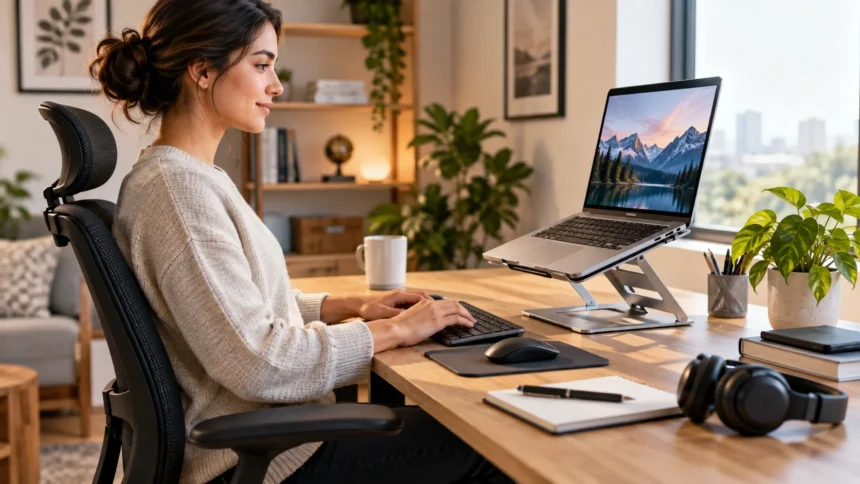
Consider whether you will type directly on the laptop or use external accessories. Once a stand raises the screen significantly, an external keyboard and mouse usually create a more practical setup because reaching upward to the built-in keyboard can become uncomfortable. Portability, ventilation, cable management, and folding size should also influence your choice if you regularly change locations.
Rain Design mStand for Stable Desk Setups
The Rain Design mStand is a long-running fixed laptop stand designed for permanent desktop use. Its single-piece aluminum construction creates a stable platform without adjustable hinges that can gradually loosen. Rain Design says the stand raises a laptop by approximately 5.9 inches, making it useful when you want to position the display closer to a comfortable viewing level.
The aluminum panel also helps conduct heat away from the laptop, while the open structure provides space around the computer for ventilation. A cable-management opening at the back can keep charging and peripheral cables organized. Because the stand does not fold or adjust, it works best for users who have a consistent desk, chair, and laptop arrangement.
Its simplicity is also one of its strengths. There are no complicated joints to reposition each morning, so you can place the laptop on the stand and maintain the same setup every day. The main limitation is that a fixed height cannot adapt easily to very different users or desks, making adjustable alternatives better for shared workstations.
Twelve South Curve Flex for Adjustable Desk Comfort
The Twelve South Curve Flex is designed for people who want more adjustment than a traditional fixed laptop riser. It allows users to change both screen height and keyboard angle, helping the stand adapt to different chairs, desks, and external displays. Twelve South says it can raise the laptop screen substantially and fold flat when you need to move it.
The stand can support laptops at least 8.66 inches wide and weighing up to seven pounds, according to the manufacturer. Its aluminum construction gives it a more substantial desktop feel than ultralight plastic travel stands. A travel sleeve is also included, making the Curve Flex practical for someone who wants adjustable ergonomics at both home and temporary work locations.
Because the height can be changed, the Curve Flex works particularly well when pairing a laptop with an external monitor. You can bring both screens closer to the same visual level instead of repeatedly looking up and down between them. The trade-off is additional weight compared with highly portable stands such as the Roost or Nexstand.
Roost V3 Plus for Frequent Travelers
The Roost V3 Plus is built around portability while still offering meaningful height adjustment. It weighs approximately six ounces and folds into a narrow 13-inch package, making it much easier to carry than solid aluminum desktop stands. Roost provides 11 selectable height settings on the V3 Plus, with a screen lift ranging from roughly 5 to 14 inches.
That broad adjustment range is especially useful for remote workers because tables and chairs vary considerably between hotels, coworking spaces, client offices, and cafés. The quick-release adjustment allows the height to be changed without completely rebuilding the setup. Its gripping mechanism is designed to adapt to laptops between approximately 12 and 18 inches while keeping the computer raised above the desk.
A portable stand like the Roost works best when combined with a compact keyboard and mouse. Once your laptop is elevated to a more comfortable screen position, trying to type on its built-in keyboard becomes impractical. The complete setup takes more bag space than using the laptop alone, but it can create a much better workstation during extended travel.
Nexstand K2 for Affordable Adjustable Portability
The Nexstand K2 offers a similar folding concept at a more accessible price point. It uses fiberglass-reinforced nylon and weighs about 234 grams, making it light enough to carry regularly. Eight adjustable height levels provide a range of approximately 5.5 to 11.8 inches, giving users considerably more flexibility than a simple fixed laptop riser.
Nexstand lists compatibility with laptops from roughly 10 to 17 inches, provided the front edge fits within its grip design. Rubber feet help keep the stand stable on the desk, while its open construction leaves much of the laptop underside exposed. This can help airflow compared with placing the computer directly on soft or poorly ventilated surfaces.
The K2 is particularly useful for students, freelancers, and remote workers who want adjustable screen height without carrying a heavy metal stand. It is less visually minimal than a single-piece aluminum design, but portability is clearly the priority. When folded, it fits easily into many laptop bags alongside a compact keyboard, mouse, charger, and other daily accessories.
MOFT Z for Flexible Sitting and Standing Positions
The MOFT Z takes a different approach by functioning as a foldable sit-stand laptop platform. Instead of using a narrow mechanical frame, it unfolds into several working configurations for laptops, tablets, books, and other devices. MOFT lists several seated angles and a standing configuration that raises the working surface by approximately 10 inches.
This design can be useful when you want to vary your setup throughout the day without installing a full standing desk. It folds to around half an inch thick, so it can be stored relatively flat when not needed. However, at roughly 960 grams, it is significantly heavier than ultralight travel stands and is better suited to people who prioritize versatility over minimal carrying weight.
The MOFT Z can also serve different purposes beyond supporting a laptop. Its multiple folding positions allow it to function as a reading or tablet stand when required. Users who regularly alternate between seated work, temporary standing, presentations, and reading may appreciate this flexibility more than someone who simply wants one fixed screen height at a permanent desk.
Fixed vs Adjustable Laptop Stands
Fixed laptop stands are usually the simplest and most stable option for permanent workstations. They contain fewer moving parts, which means there are fewer hinges that can loosen or shift over time. If you use the same desk and chair every day and the stand places your screen at a comfortable height, there may be little practical reason to pay for additional adjustment.
Adjustable stands are more useful when several people share a workspace or when you frequently switch between sitting positions. Height and angle controls allow the setup to adapt to different users, desks, and external displays. They also provide more flexibility if you change chairs or redesign your workstation instead of forcing you to replace the stand.
The compromise is that adjustable mechanisms introduce more complexity. Some stands require firm hinges to support heavier laptops, making them harder to reposition while the computer is sitting on top. Consider how often you will actually change the height, because a well-chosen fixed stand may be more convenient than an adjustable model you rarely adjust.
How to Set Up a Laptop Stand Comfortably
Begin by adjusting your chair and desk rather than treating the laptop stand as the only ergonomic solution. Your feet should feel supported and your arms should be able to reach your keyboard and mouse comfortably. Then raise the laptop so the screen sits at a comfortable viewing height that reduces the need to repeatedly bend your neck downward.
When the laptop is elevated significantly, use an external keyboard and mouse instead of reaching toward the built-in keyboard. Position them close enough that your elbows and shoulders can remain relaxed while working. Keep frequently used accessories within easy reach so improved screen height does not create new problems by forcing you to stretch across the desk.
Screen distance also matters. Move the laptop closer or farther away until text is easy to read without leaning your head forward. Increase operating-system text size or application zoom if necessary rather than moving your face closer to the display, especially when working with small laptop screens for several hours.
Laptop Stands for Remote Work and Dual Screens
Remote workers often need more screen space than a laptop alone provides. A raised laptop can function as a secondary display beside a desktop monitor, allowing you to keep communication apps, notes, research, or reference material visible. Matching the height of both screens can also create a cleaner visual arrangement and reduce unnecessary head movement between displays.
Travelers can achieve a similar setup without carrying a full desktop monitor. Pairing a lightweight laptop stand with one of the portable monitors can create a flexible dual-screen workstation that fits inside a backpack. This can be especially useful for developers, writers, designers, marketers, analysts, and other professionals who regularly work from temporary locations.
Keep the screen you use most directly in front of you whenever possible. A second display can sit beside it for occasional reference, while two equally important displays may work better positioned closer together. Avoid spreading screens so widely that you constantly rotate your neck from one extreme side of the desk to the other.
Cooling, Ventilation and Laptop Stability
Laptop stands can also help create more open space beneath a computer. Many notebooks draw or exhaust air through vents around the bottom, rear, or sides, so keeping those areas unobstructed can support normal cooling. Open-frame designs such as the Nexstand and Roost leave much of the underside exposed instead of pressing the laptop against a desk surface.
However, a stand should not cover important vents or prevent the laptop from resting securely. Some adhesive or ultra-thin designs can interact differently with computers that have large bottom ventilation areas. Always look at your laptop’s airflow layout before choosing a stand that attaches directly to the underside or places broad material beneath the chassis.
Stability should remain a priority even when airflow is excellent. Anti-slip pads, secure front grips, and a wide base reduce the risk of the laptop shifting when you adjust the screen or connect a cable. If a stand wobbles significantly during normal use, lower its height or choose a more substantial design for heavier computers.
Best Practices for Using a Laptop Stand
Do not assume that simply buying a stand automatically creates a comfortable workstation. Spend a few minutes adjusting the height, chair, keyboard, mouse, and screen distance together. Small changes can make a larger difference than choosing the most expensive stand, particularly when the original problem comes from the entire workstation rather than the laptop height alone.
Change position periodically instead of trying to maintain one supposedly perfect posture for an entire workday. Stand up, walk briefly, stretch, or perform another task away from the computer when practical. A laptop stand can improve screen placement, but regular movement still matters when work requires many hours of sitting or computer use.
Finally, choose a stand based on how you actually work. A heavy aluminum stand can be excellent at a permanent desk but frustrating for frequent travelers, while an ultralight folding stand may feel unnecessary if it never leaves your office. Matching the design to your working environment is more useful than choosing purely according to appearance or popularity.
Conclusion
The best laptop stands for better ergonomics make it easier to raise your screen and organize a more comfortable workstation. Rain Design’s mStand is a simple, stable choice for permanent desks, while Twelve South Curve Flex adds useful height and angle adjustment. Both suit people who value a polished desktop setup more than extreme portability.
Remote workers and travelers may prefer lightweight solutions such as the Roost V3 Plus or Nexstand K2. These stands fold down for transportation while still providing meaningful screen-height adjustment. The MOFT Z offers another approach by creating several sitting and standing configurations for users who value versatility during the workday.
Whichever stand you choose, think beyond the stand itself. An external keyboard, mouse, appropriate chair position, comfortable viewing distance, and regular movement all contribute to a better computer setup. A stand works best as one component of a thoughtfully arranged workspace rather than as a complete ergonomic solution by itself.
FAQs
Are laptop stands actually better for ergonomics?
A laptop stand can help raise the display to a more comfortable viewing position and reduce repeated downward viewing. For larger height adjustments, pair the stand with an external keyboard and mouse.
How high should a laptop stand be?
The ideal height depends on your body, chair, desk, and screen size. Adjust the stand until you can view the display comfortably without repeatedly bending your neck or leaning forward.
Should I type directly on a raised laptop stand?
Typing directly on a highly elevated laptop can create an uncomfortable arm and wrist position. An external keyboard and mouse are generally more practical when the screen is raised significantly.
Are portable laptop stands stable enough?
Quality folding stands can support everyday laptop work when positioned correctly on a stable surface. Check laptop compatibility, weight limits, gripping mechanisms, and non-slip feet before choosing a portable model.
Do laptop stands help keep computers cooler?
Open laptop stands can improve airflow by leaving more space around bottom vents. Cooling benefits vary by laptop design, so make sure the stand does not block the specific intake or exhaust areas on your computer.