What Is a Microcomputer? Types, Uses & Examples
Microcomputers are among the most familiar computing devices in the world, even though many people rarely use the term today. Desktop PCs, laptops, tablets, and many other personal computing systems developed from the concept of the microcomputer: a relatively compact computer built around a microprocessor. These machines transformed computing by making digital technology affordable and accessible to individuals, schools, offices, laboratories, and small businesses rather than limiting it to large organizations with expensive computer systems. Modern microcomputers can perform tasks ranging from writing documents and browsing the internet to programming, gaming, accounting, communication, and data analysis. This guide explains what a microcomputer is, how it works, its major types, components, uses, examples, advantages, limitations, and how it differs from other classes of computers.
What Is a Microcomputer?
A microcomputer is a relatively small computer that uses a microprocessor as its central processing unit, or CPU. The microprocessor contains the primary processing circuitry needed to execute instructions, perform calculations, and control other components of the system. Microcomputers were originally distinguished from larger computer systems such as mainframes and minicomputers because their processing power could be contained within a much smaller and more affordable machine. Most were designed primarily for use by one person at a time. Modern personal computers, including desktops and laptops, are therefore commonly considered descendants of the traditional microcomputer.
The term became especially important during the 1970s and 1980s when improvements in semiconductor technology allowed computer processors to fit onto individual integrated circuits. Before microprocessors became widely available, computers often required large numbers of separate electronic components and could occupy entire rooms. The arrival of the microprocessor significantly reduced the physical size and manufacturing cost of computing systems. This development made it possible for individuals, schools, and smaller companies to purchase computers rather than depending entirely on centralized computing facilities. The growth of microcomputers eventually helped establish the personal computer industry and changed how people interacted with technology.
A basic microcomputer includes more than just a processor. It normally contains memory, storage, input and output interfaces, system software, and connections that allow the CPU to communicate with other components. Users interact with the machine through devices such as keyboards, mice, touchscreens, displays, cameras, or other peripherals. Modern microcomputers may also include wireless networking, graphics processors, audio hardware, and specialized security components. Although their designs have become much more sophisticated, the fundamental concept remains similar. A relatively compact computer combines processing, memory, storage, and input-output capabilities to perform tasks for an individual user or a specific application.
The word microcomputer is used less frequently in everyday conversation today because terms such as personal computer, PC, laptop, and desktop computer have become more common. However, the concept is still useful when studying computer history, computer architecture, and different classifications of computing systems. In broader technical discussions, some compact embedded and single-board computers may also be described as microcomputers depending on how the term is being used. The boundaries are not always perfectly standardized. Technology has advanced so dramatically that modern smartphones can outperform many early microcomputers while belonging to a different product category. Context therefore matters when deciding which devices should be classified as microcomputers.
Microcomputers are important because they helped shift computing from centralized institutional equipment toward everyday tools that individuals could control directly. Early personal computing allowed people to write programs, manage finances, create documents, play games, and explore digital information from their own desks. Today, the same basic idea supports far more powerful activities, including video editing, software development, online collaboration, graphic design, scientific analysis, and cloud computing. The machines have become faster and smaller while remaining based on microprocessor-centered architectures. Understanding microcomputers therefore provides useful background for understanding the development of modern personal computing and the role computers play in daily life.
How Does a Microcomputer Work?
A microcomputer works by receiving data and instructions, processing them through its CPU, storing information when necessary, and producing useful output. The processor repeatedly fetches instructions from memory, decodes what each instruction means, and executes the required operation. These operations may involve arithmetic, logic, data movement, or communication with other hardware components. The process happens extremely quickly, often billions of times per second in modern systems. Operating systems and applications organize these operations into tasks that users can understand. When someone opens a document, launches a browser, or runs a program, the microcomputer coordinates many individual instructions behind the scenes.
The CPU is responsible for much of this processing activity, but it depends heavily on memory. Random access memory, or RAM, temporarily stores programs and data that the computer is actively using. More RAM generally allows the system to keep more applications and information available without repeatedly retrieving them from slower storage. When the computer is turned off, ordinary RAM loses its contents, which is why permanent storage is also required. Solid-state drives and hard disk drives preserve operating systems, applications, documents, photos, and other files. This combination of fast temporary memory and long-term storage allows a microcomputer to work efficiently while retaining important information.
Input devices allow users and other systems to send information to the microcomputer. Common examples include keyboards, mice, microphones, cameras, touchscreens, scanners, and network connections. The computer interprets these signals and converts them into forms that software can process. Output devices perform the opposite role by presenting processed information through displays, speakers, printers, or connected equipment. Many devices operate as both input and output systems. A touchscreen, for instance, displays information while also detecting user touches. Networking hardware similarly sends and receives data, allowing microcomputers to communicate with websites, cloud services, printers, servers, and other computers.
The operating system coordinates hardware and software so users do not need to control individual electronic components manually. Popular desktop operating systems manage files, memory, processors, security, applications, networking, and peripheral devices through a common software environment. When an application needs to save a file, display an image, or connect to the internet, it typically relies on services provided by the operating system. Device drivers help the operating system communicate with specific hardware. This layered structure makes modern microcomputers much easier to use. Applications can focus on performing useful tasks while the operating system handles much of the underlying interaction with physical components.
Modern microcomputers often divide work among several specialized processors rather than relying entirely on one general-purpose CPU. A graphics processing unit can accelerate graphics rendering, video processing, artificial intelligence workloads, and other highly parallel calculations. Dedicated controllers may manage storage, networking, audio, security, and power functions. Some systems combine many of these capabilities within a system on a chip, commonly called an SoC. This approach can reduce power consumption and physical size while improving integration. Despite these architectural changes, the machine still follows the fundamental computing cycle of accepting input, processing data, storing information, and producing output according to software instructions.
Types of Microcomputers
Desktop computers are one of the most recognizable types of microcomputers. A traditional desktop system usually includes a separate computer case containing the processor, memory, storage, motherboard, and other internal hardware. Users connect external peripherals such as a monitor, keyboard, mouse, speakers, and sometimes a webcam or printer. Desktop computers are popular in offices, schools, homes, engineering environments, and gaming setups because they can provide strong performance and flexible upgrade options. Many models allow users to replace memory, storage, graphics cards, and other components. Their main disadvantage compared with portable devices is that they are designed primarily to remain in one location.
Laptop computers are portable microcomputers that combine most essential components into one compact device. A laptop typically includes a built-in screen, keyboard, trackpad, battery, speakers, camera, wireless connectivity, processor, memory, and storage. This design allows users to work from offices, classrooms, homes, airports, and other locations without carrying separate peripherals. Modern laptops range from lightweight models designed for everyday productivity to powerful machines intended for gaming, software development, engineering, and creative work. Portability does involve trade-offs because internal components are often harder to upgrade or replace than desktop hardware. Battery life and thermal management also influence laptop design.
Tablet computers represent another form of compact personal computing. Tablets usually rely on touchscreen interfaces and are designed to be lighter and more portable than conventional laptops. Users commonly use them for browsing, reading, video streaming, digital drawing, presentations, note-taking, communication, and lightweight office tasks. Some tablets support detachable keyboards, styluses, external monitors, and desktop-like software, making the distinction between tablets and laptops increasingly blurred. Their processors are highly integrated and often optimized for energy efficiency. Although not every classification system uses the word microcomputer for tablets, they share many characteristics with modern personal computing devices built around compact microprocessor-based architectures.
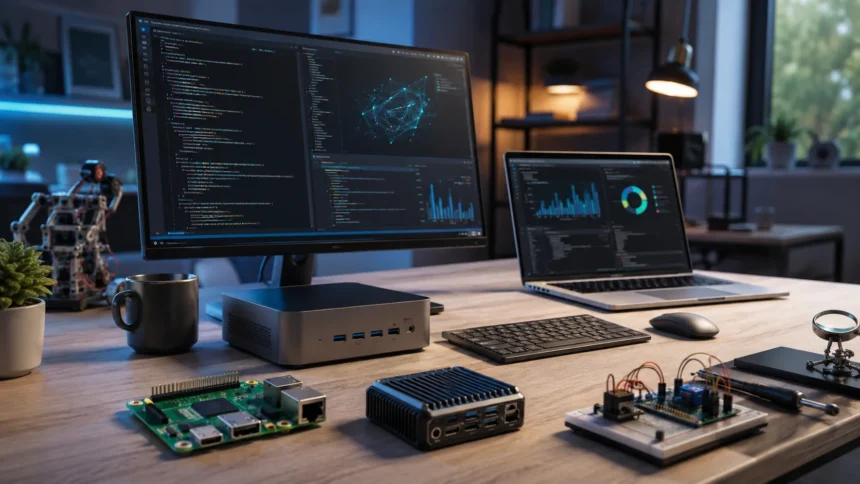
Single-board computers are compact systems in which the processor, memory, input-output connections, and other important components are installed on a single circuit board. They are commonly used for education, programming projects, electronics experiments, automation, robotics, and embedded development. Unlike conventional desktop PCs, single-board computers are often sold as small boards that users connect to storage, power supplies, displays, and accessories as required. Their low cost and flexibility make them useful for learning about computing and hardware control. Some models can run full operating systems and perform many everyday computer tasks. Others are optimized for specialized projects rather than general personal computing.
Workstations are high-performance personal computers designed for demanding professional workloads. They may be used for engineering, architecture, 3D modeling, scientific research, software development, video production, and other tasks requiring significant computing power. Workstations typically contain faster processors, larger amounts of memory, professional graphics hardware, and storage configurations designed for reliability or high performance. Although they are more powerful than ordinary desktop PCs, they can still fall within the broad microcomputer or personal-computer category because they are usually designed for individual users. The distinction is based more on capability and purpose than on completely different computer architecture. Modern workstation performance illustrates how far microcomputer technology has advanced.
Main Components of a Microcomputer
The central processing unit is often described as the brain of a microcomputer because it interprets and executes program instructions. Modern CPUs may contain several processing cores, allowing multiple tasks or instruction streams to be handled simultaneously. Processor speed is influenced by clock frequency, architecture, cache memory, core count, and software efficiency rather than one specification alone. The CPU performs calculations and coordinates many operations occurring throughout the system. It communicates with memory, storage, graphics hardware, and input-output devices through the motherboard. Improvements in processor technology have been central to the dramatic performance gains seen in personal computers over several decades.
The motherboard provides the main communication platform for the microcomputer’s internal components. It contains electrical pathways, connectors, sockets, controllers, and other circuitry that allow the processor, memory, storage, and expansion devices to work together. Desktop motherboards may provide slots for graphics cards, networking devices, additional storage controllers, or specialized hardware. Laptop motherboards are usually more compact and may integrate many components directly onto the board. The motherboard also contains firmware that helps initialize hardware when the computer starts. Compatibility between the motherboard, CPU, memory, and other devices is essential when building or upgrading a computer system.
Memory and storage perform different but complementary roles. RAM holds information that the processor needs quickly while programs are running, while permanent storage keeps files even after the machine is powered off. Solid-state drives have become common because they provide fast access times and contain no mechanical moving parts. Traditional hard disk drives can still provide large storage capacities at relatively low cost, particularly for archives and bulk data. Some microcomputers use integrated flash storage instead of removable drives. Adequate memory and fast storage can significantly affect everyday performance, especially when users run multiple applications, open large files, or perform data-intensive workloads.
Input and output hardware allows the microcomputer to interact with users and external systems. Keyboards and pointing devices remain common input tools, while touchscreens, microphones, cameras, game controllers, and biometric sensors provide additional methods of interaction. Monitors and speakers are common output devices, while printers produce physical copies of digital information. External ports can connect storage devices, displays, accessories, and specialized equipment. Wireless technologies such as Wi-Fi and Bluetooth reduce the need for physical connections. The wide variety of available peripherals is one reason microcomputers can support such a broad range of personal, educational, creative, and professional activities.
Power supplies and cooling systems are also essential even though they receive less attention from many users. Desktop power supplies convert electrical power into voltages that internal components can safely use, while laptops rely on both external adapters and rechargeable batteries. Processors and graphics hardware generate heat during operation, particularly under demanding workloads. Fans, heat sinks, heat pipes, and other cooling systems move heat away from sensitive electronic components. Effective thermal management helps maintain performance and hardware reliability. Compact microcomputers must balance processing power, energy consumption, noise, physical size, and heat dissipation, making power and cooling important parts of overall system design.
Common Uses of Microcomputers
Office productivity is one of the most common uses of microcomputers. Employees use desktop and laptop systems to create documents, manage spreadsheets, prepare presentations, access business applications, communicate with colleagues, and organize company information. Email, video conferencing, project management, accounting, and customer relationship management platforms can all run through or be accessed from personal computers. Cloud services have expanded these capabilities by allowing employees to collaborate on documents and access software through web browsers. Microcomputers therefore remain central to many modern workplaces. Even businesses that rely heavily on cloud infrastructure still require user devices capable of connecting employees to those online services.
Education is another major area where microcomputers are widely used. Students can access digital textbooks, online courses, research materials, learning management systems, educational videos, and interactive exercises from personal computers. Teachers use microcomputers to prepare lessons, manage student records, create presentations, communicate with families, and deliver remote instruction. Computer laboratories also allow students to learn programming, graphic design, data analysis, and other technical skills. Low-cost single-board computers can introduce students to electronics and computing concepts through hands-on experiments. As digital learning continues to develop, microcomputers provide flexible platforms for both classroom instruction and independent study.
Creative professionals rely on microcomputers for photography, graphic design, music production, video editing, animation, and digital illustration. These activities can require substantial processing power, memory, graphics performance, and storage capacity, which is why creative users often choose higher-performance computers. Specialized software allows individuals to perform tasks that once required expensive dedicated production equipment. Musicians can record and edit multiple audio tracks, while photographers can process large collections of high-resolution images. Video creators can edit and export professional-quality footage from desktop workstations or powerful laptops. Microcomputers have therefore helped make advanced creative tools accessible to individuals and small studios.
Software development and technical work are also major uses of microcomputers. Programmers use them to write code, test applications, manage databases, run development environments, and connect to cloud platforms. Engineers and scientists may use high-performance personal computers for simulation, mathematical modeling, computer-aided design, and data analysis. Network administrators can configure infrastructure and monitor systems from workstations or laptops. Cybersecurity professionals use computers for authorized testing, monitoring, research, and defensive analysis. Although large-scale computations may eventually run on servers or cloud infrastructure, microcomputers often serve as the primary interface through which professionals create, control, and interpret those workloads.
Entertainment remains another important use. People use microcomputers to play video games, watch streaming services, edit personal media, communicate through social networks, listen to music, and participate in online communities. Gaming PCs can include powerful graphics processors and high-refresh-rate displays designed for demanding interactive applications. Home computers may also serve as media libraries or connect to televisions and audio systems. Internet connectivity has expanded entertainment beyond locally installed software by enabling multiplayer gaming, live streaming, digital content stores, and cloud-based services. The versatility of microcomputers allows one machine to support productivity during the day and entertainment during personal time.
Examples of Microcomputers
A standard home desktop PC is a straightforward example of a modern microcomputer. It may contain a multi-core processor, several gigabytes of RAM, a solid-state drive, integrated or dedicated graphics, and network connectivity within a compact case. The user controls the machine through a keyboard, mouse, and monitor. Despite having far more computing power than early microcomputers, it follows the same core principle of providing microprocessor-based computing for an individual user. Home desktops may be used for web browsing, schoolwork, budgeting, entertainment, programming, or gaming. Their modular design often makes them easier to repair and upgrade than smaller portable devices.
A business laptop is another everyday microcomputer example. It contains most of the same fundamental components as a desktop computer but integrates them into a portable enclosure with a battery and display. Professionals can use laptops for communication, presentations, spreadsheets, project management, customer meetings, and remote access to company systems. Docking stations can connect laptops to larger displays, full-size keyboards, wired networks, and other office equipment when employees are at their desks. When disconnected, the same computer can travel with the user. This combination of portability and full computing capability has made laptops one of the dominant forms of personal computing.
A compact single-board computer provides a different example. These devices place most essential computing components on one small circuit board and can often run a full operating system. Hobbyists may use them to build home automation systems, media devices, retro gaming projects, robots, weather stations, or programming environments. Schools can use them to teach basic coding and electronics without requiring expensive equipment. Businesses may also deploy similar compact systems for digital signage, monitoring, automation, or specialized control applications. Their small size demonstrates that a capable microcomputer no longer needs the large case traditionally associated with desktop personal computers.
Professional workstations are examples of high-end microcomputers used for specialized workloads. An engineering workstation might include a powerful processor, professional graphics card, large memory capacity, and several high-speed storage devices. Architects can use such systems to create complex building models, while video professionals may edit high-resolution footage and visual effects. Scientists can perform local data analysis or prepare jobs that will later run on larger computing infrastructure. These systems can cost significantly more than ordinary personal computers, but they remain designed primarily for individual professional users. Workstations show that microcomputer classification does not necessarily imply low processing power.
Historical machines also provide important microcomputer examples because they show how the category originally developed. Early hobbyist and personal systems demonstrated that computers could become small and affordable enough for individuals to own. Later consumer machines brought graphical software, games, productivity applications, and programming into homes and schools. Their hardware capabilities were tiny by modern standards, often providing memory measured in kilobytes rather than gigabytes. Nevertheless, they helped establish many ideas that remain familiar today, including personal software, removable storage, keyboards, displays, and local applications. Modern PCs are vastly more powerful, but they are part of the same broader evolution toward individual access to computing.
Advantages of Microcomputers
Affordability has historically been one of the greatest advantages of microcomputers. Earlier generations of computers were extremely expensive and were typically purchased by governments, universities, large companies, or research institutions. Microprocessor-based systems dramatically reduced the cost required to provide useful computing power. Today, personal computers are available across a broad range of prices, from inexpensive compact systems to premium workstations. This makes computing accessible to households, students, freelancers, small businesses, and organizations of nearly every size. Although high-end machines can still be costly, users can often choose a system that matches their workload rather than purchasing far more computing capacity than they need.
Compact size is another major advantage. Desktop PCs can fit on or under a desk, while laptops and tablets can be carried between locations. Single-board computers can be smaller than many books while still running operating systems and applications. Improvements in semiconductor manufacturing allow billions of electronic components to fit within processors that occupy only a small area. Reduced size has made computing practical in classrooms, homes, vehicles, laboratories, retail counters, and temporary workspaces. Portable microcomputers have also supported remote and hybrid work. Employees can carry the same device between an office, home, client site, and other locations instead of relying on fixed terminals.
Ease of use has improved significantly as operating systems and graphical interfaces have developed. Early computer users often needed detailed knowledge of commands and hardware, but modern microcomputers provide visual menus, icons, touch controls, search tools, and automated configuration. Users can install applications for specific tasks without understanding how processors or memory operate internally. Plug-and-play peripherals also simplify adding printers, displays, storage devices, cameras, and other accessories. Accessibility features can adapt interfaces for different user needs. Although advanced computer skills remain valuable, everyday microcomputers are designed so that people can perform common activities without being computer engineers or programmers.
Flexibility is another important advantage because the same microcomputer can perform many unrelated tasks. A student might use one laptop for writing assignments, attending video classes, programming, watching movies, and communicating with friends. A small business owner can use a desktop for bookkeeping, inventory management, marketing, customer support, and online sales. Specialized applications extend computers into fields such as architecture, music, healthcare, research, and manufacturing. Users can also connect external peripherals when additional capabilities are required. This software-driven flexibility makes microcomputers more versatile than devices designed to perform only one fixed function.
Connectivity greatly expands what microcomputers can accomplish. Through local networks and the internet, personal computers can access websites, cloud applications, remote servers, shared storage, printers, communication platforms, and online databases. Users can collaborate with people in different countries almost instantly. Businesses can run lightweight local applications while accessing powerful computing resources hosted in data centers when necessary. This creates a useful relationship between microcomputers and cloud computing rather than making one replace the other. The microcomputer serves as the user’s interactive endpoint, while remote infrastructure provides additional storage, applications, or processing capacity. Together, these technologies support highly flexible modern computing environments.
Limitations of Microcomputers
Microcomputers generally have lower maximum computing capacity than large systems designed specifically for massive workloads. A high-end workstation can be extremely powerful, but large scientific simulations, enterprise transaction systems, and artificial intelligence training workloads may require clusters, data center servers, or supercomputers. Personal systems contain practical limitations related to physical size, electricity, memory capacity, cooling, and cost. Adding more processors is not always efficient within a desktop or laptop design. For typical users these limitations are rarely a problem. However, organizations should choose computing platforms according to workload rather than assuming that one powerful personal computer can replace infrastructure designed for large-scale parallel processing.
Hardware failure can interrupt productivity when important work depends on one personal computer. Storage devices, displays, batteries, power supplies, cooling systems, and other components can fail unexpectedly. Laptops may also be lost, stolen, or physically damaged because they travel frequently. Users can reduce these risks through reliable backups, cloud synchronization, warranty coverage, security controls, and appropriate equipment maintenance. Businesses should avoid storing the only copy of important information on individual computers. Centralized backup and identity systems can make replacement easier. The convenience of personal computing therefore needs to be balanced with processes that protect data and allow employees to continue working after device problems.
Security is another major concern because microcomputers frequently connect to the internet and store valuable personal or business information. Malware, phishing, stolen credentials, unsafe software, and unpatched vulnerabilities can create risks for individual devices and connected networks. Portable computers introduce additional exposure because they may connect to public Wi-Fi or operate outside company facilities. Security practices should include timely updates, strong authentication, appropriate endpoint protection, secure backups, and careful software installation. Organizations may also use centralized device-management tools to apply policies consistently. Microcomputers are powerful and flexible, but that flexibility also means users and administrators must manage security responsibly.
Upgradeability varies significantly between different microcomputer designs. Traditional desktop systems can often accept additional memory, storage, graphics cards, or replacement processors when compatible hardware is available. Thin laptops and tablets may have many components permanently integrated or soldered to the motherboard, making upgrades difficult or impossible. This can shorten the practical lifespan of devices when requirements change. Users should therefore consider future needs before purchasing systems with fixed memory or storage. Repairability is another related issue because highly integrated designs may require replacing entire assemblies rather than individual parts. Portability and thin design often involve trade-offs with modularity.
Microcomputers can also become performance bottlenecks when users run applications that exceed their available resources. Too little memory can cause slow multitasking, while limited storage can make large projects difficult to manage. Inadequate graphics hardware may struggle with demanding games, 3D applications, or video editing. Older processors can become less suitable as modern software grows more resource-intensive. Buying the most expensive computer is not always the solution, because different workloads depend on different components. Users should match processor performance, memory, graphics capability, storage, and connectivity to the tasks they expect to perform. Appropriate specifications produce better value than relying only on general labels such as fast or powerful.
Microcomputer vs. Minicomputer, Mainframe and Supercomputer
Microcomputers were historically differentiated from minicomputers, which were larger multi-user systems positioned between personal machines and mainframes. Minicomputers often served departments, laboratories, factories, or smaller organizations that needed several users to access one central computer. As server technology and powerful microprocessors developed, the traditional minicomputer category became much less distinct. Modern rack servers can provide capabilities that once required specialized midrange computer systems. The terminology therefore appears more frequently in historical discussions than in everyday technology purchasing. Microcomputers, by contrast, developed primarily around individual use and eventually evolved into modern desktop and laptop personal computers.
Mainframe computers are designed to handle very large volumes of reliable transaction processing and support substantial numbers of simultaneous users or workloads. Banks, governments, airlines, insurers, and other large organizations may use mainframes for critical systems where reliability, security, scalability, and high-volume processing are essential. A microcomputer is usually intended for one primary user, even though it can run network services and support multiple applications. Mainframes also feature architectures and operational capabilities designed for continuous enterprise workloads. Comparing them only by processor speed misses important differences. The systems are built for different purposes, management models, availability requirements, and scales of operation.
Supercomputers occupy another category because they are designed to perform extremely large numbers of calculations at high speed. They commonly use massive parallel processing involving many processors or accelerators working together. Scientists can use supercomputers for climate modeling, physics simulations, molecular research, engineering, astronomy, and other computationally intensive tasks. A microcomputer cannot match this scale, even though modern personal computers are extraordinarily powerful compared with historical machines. Supercomputing performance is also measured and managed differently because workloads are distributed across many computing units. The distinction therefore relates primarily to scale and purpose rather than simply whether a system uses microprocessor technology.
Servers can make the comparison more complicated because many modern servers use processors related to those found in personal computers. The difference often lies in how the system is designed and used. A server is optimized to provide resources, applications, or services to multiple users or devices across a network, while a personal microcomputer is primarily an endpoint used directly by an individual. Servers may include redundant power supplies, error-correcting memory, remote management features, and storage designed for continuous operation. Hardware categories can overlap, especially in small offices where an ordinary PC is occasionally used as a simple server. Function therefore matters as much as physical construction.
Modern computing has blurred many historical classifications because small devices now provide processing power that once required much larger machines. A smartphone can outperform some early workstations, while cloud platforms allow laptops to control enormous remote computing resources. Nevertheless, classifications remain useful for understanding intended scale. Microcomputers emphasize personal or localized computing, servers provide shared network resources, mainframes emphasize large-scale enterprise transaction processing, and supercomputers focus on massive computational workloads. These categories can overlap technologically without becoming identical in purpose. Understanding the differences helps users choose appropriate systems and appreciate how dramatically computing technology has evolved.
How to Choose the Right Microcomputer
The first step in choosing a microcomputer is identifying the tasks the machine will perform. Basic web browsing, email, document editing, and streaming generally require less processing power than 3D rendering, engineering software, gaming, video editing, or large-scale data analysis. Buying hardware without considering workload can lead to unnecessary expense or frustrating performance limitations. Users should list the applications they expect to run and review their recommended requirements. Business buyers should also consider whether software vendors have specific operating system or hardware requirements. Matching the computer to real activities is more useful than simply purchasing the newest or most heavily advertised model.
Processor and memory specifications are important because they influence responsiveness and multitasking. Everyday users may be comfortable with mainstream processors and moderate memory capacity, while professional workloads can benefit from more cores, faster processors, and larger amounts of RAM. Memory is particularly important when running many browser tabs, large spreadsheets, virtual machines, creative software, or development tools simultaneously. Users should also consider whether memory can be upgraded later. A computer with slightly more capacity than current requirements may remain useful longer. However, specifications should be evaluated together because a fast processor cannot fully compensate for insufficient memory or slow storage in every workload.
Storage requirements depend on both capacity and performance. Solid-state drives provide fast startup times, quick application loading, and responsive file access, making them a common choice for primary storage. Users who keep large video, photography, engineering, or game libraries may need additional capacity. Cloud storage and external drives can supplement local storage, but internet access and backup requirements should be considered. Business users should also evaluate encryption and data-protection features. Purchasing enough storage for future growth can reduce inconvenience, particularly in laptops where internal upgrades may be difficult. Storage strategy should therefore reflect file size, portability, security, and backup needs.
Portability is another major decision. Desktop computers usually provide better upgradeability, cooling, and performance flexibility for the price, but they remain tied to a particular workspace. Laptops allow employees and students to work from different locations but include compromises involving battery life, thermal limits, screen size, and repairability. Tablets can provide even greater portability for reading, note-taking, presentations, and touch-focused applications. Buyers should consider how often the device will move and whether external monitors or docking stations will be used. Choosing the right form factor can improve everyday convenience as much as selecting the right internal hardware.
Finally, users should consider long-term support, security, repairability, and total cost rather than focusing only on the purchase price. Operating system updates, warranty coverage, battery replacement, software compatibility, and available repair services can influence how long the computer remains useful. Businesses may benefit from standardized models because they simplify support and spare-parts management. Individuals should consider whether important components such as storage or memory can be replaced. Energy efficiency may also matter for devices used throughout the day. A well-chosen microcomputer should provide enough performance for current needs while offering a reasonable path through several years of software and workload changes.
Frequently Asked Questions
What is a microcomputer in simple terms?
A microcomputer is a relatively small computer built around a microprocessor and designed mainly for individual use. Desktop PCs and laptops are among the most common modern examples.
What are the main types of microcomputers?
Common types include desktop computers, laptops, tablets, single-board computers, and professional workstations. The exact classification can vary because modern computing categories increasingly overlap.
What are microcomputers used for?
Microcomputers are used for office work, education, programming, internet access, communication, gaming, creative production, business management, scientific work, and many other activities. Their flexibility allows the same device to run thousands of different software applications.
What is the difference between a microcomputer and a mainframe?
A microcomputer is usually designed primarily for an individual user, while a mainframe is built to handle large-scale enterprise workloads and many simultaneous users or transactions. Mainframes also emphasize extremely high reliability, availability, and centralized management.
Is a laptop a microcomputer?
Yes, laptops are generally considered a modern form of microcomputer because they use microprocessor-based architecture and provide complete personal computing capabilities in a compact device. The term microcomputer is simply used less often today than terms such as laptop or personal computer.