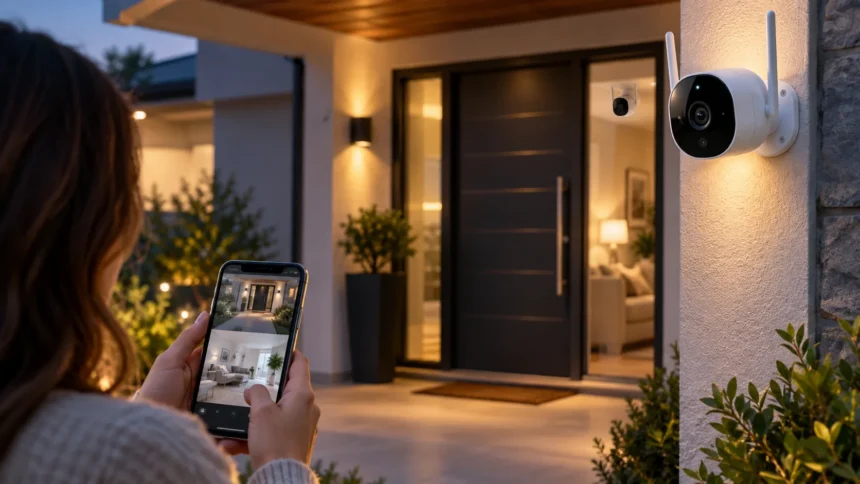
Wi-Fi security cameras make it easier to monitor your home whether you are in another room, at work, or traveling. Modern wireless cameras can provide live video, motion alerts, night vision, two-way audio, and cloud or local recording through a smartphone app. These features help homeowners keep an eye on entrances, children, pets, deliveries, and important areas around the property.
The best Wi-Fi camera for home security depends on where you plan to install it and which features matter most. Indoor cameras focus on convenience and privacy, while outdoor models need weather resistance, stronger night vision, and reliable motion detection. Understanding the main camera types and specifications can help you build a practical security setup without paying for unnecessary features.
Why Wi-Fi Cameras Are Useful for Home Security
Wi-Fi cameras provide remote access to your home through an internet-connected smartphone, tablet, or computer. Instead of relying only on recorded footage, you can check a live view whenever something seems unusual. Motion notifications can also alert you when activity is detected, helping you respond quickly to visitors, deliveries, pets, or unexpected movement around your property.
Another major advantage is flexible installation. Many wireless home security cameras can be placed on shelves, mounted on walls, or installed near doors without complicated networking equipment. Battery-powered options provide even greater flexibility because they do not require a nearby electrical outlet, although wired cameras usually offer more consistent power for continuous monitoring.
Wi-Fi security cameras can also become part of a wider smart home system. Depending on the model, they may work alongside voice assistants, smart lighting, sensors, and other connected devices. This integration allows homeowners to create convenient routines that make monitoring, lighting, and everyday home management easier from a single ecosystem.
Best Indoor Wi-Fi Cameras for Everyday Monitoring
Indoor Wi-Fi cameras are useful for monitoring living rooms, hallways, nurseries, offices, and other important spaces inside the home. A good indoor camera should deliver clear video without requiring a complicated setup. Features such as motion detection, two-way communication, activity zones, and mobile alerts make everyday monitoring much more practical.
Video quality matters because an unclear image can make important details difficult to identify. Full HD resolution is sufficient for many indoor environments, while higher-resolution cameras can provide additional detail in larger rooms. A wide viewing angle is also helpful because it allows one camera to cover more of the room instead of requiring several devices.
Privacy controls should be another important consideration for indoor cameras. Some models include physical privacy shutters, camera-off modes, or scheduling options that disable recording when household members are home. These features give users greater control over when monitoring takes place while still allowing the camera to provide security when the property is unattended.
Best Outdoor Wi-Fi Cameras for Home Protection
Outdoor security cameras must handle more demanding conditions than indoor models. A reliable outdoor Wi-Fi camera should be built to withstand rain, dust, temperature changes, and direct sunlight while continuing to provide stable video. Weather-resistant construction is particularly important for cameras installed near driveways, gardens, gates, garages, and exposed entrances.
Night visibility is another critical feature for outdoor home security. Infrared night vision can provide a clear monochrome image in darkness, while some cameras use built-in lights to produce color footage at night. Better low-light performance can make it easier to recognize clothing, vehicles, animals, and other details when activity happens after sunset.
Strong motion detection can also reduce unnecessary alerts. Advanced cameras may distinguish between people, vehicles, animals, and general movement rather than notifying you every time a tree branch moves. Adjustable motion zones can further improve accuracy by allowing users to focus detection on doors, driveways, walkways, or other areas where movement actually matters.
Best Wi-Fi Cameras for Night Vision
Home security cameras need to remain useful after dark because many properties have limited lighting around entrances and outdoor spaces. A camera with strong night vision can monitor areas that would otherwise appear completely dark. Infrared LEDs are commonly used to illuminate the scene invisibly, allowing the camera to record usable footage without keeping bright lights switched on.
Color night vision offers another option for people who want more visual detail. Some cameras use sensitive image sensors, spotlights, or ambient lighting to retain color in low-light conditions. Color footage can sometimes make objects easier to distinguish, although performance depends heavily on available light, camera placement, and the distance between the camera and subject.
Consider the actual area you need to monitor rather than choosing based only on the advertised night-vision range. A camera facing a small porch has very different requirements from one monitoring a long driveway. Proper placement and avoiding strong reflections from nearby walls can also significantly improve nighttime image quality.
Best Wi-Fi Cameras for Front Doors and Entrances
The front entrance is one of the most important areas to monitor because it receives visitors, deliveries, service workers, and regular household traffic. A Wi-Fi camera positioned near the door should offer clear facial detail and fast motion alerts. A wide field of view can help capture both the doorway and nearby pathway without leaving large blind spots.
Two-way audio is particularly valuable for entrance monitoring. It allows homeowners to speak with visitors through the camera using a mobile app, even when nobody is physically at home. This feature can be useful for giving delivery instructions, communicating with guests, or responding to unfamiliar visitors without opening the door.
Placement strongly affects camera performance around entrances. Install the camera high enough to prevent easy tampering but not so high that faces are captured only from above. Avoid pointing it directly toward intense sunlight, reflective glass, or bright lights because excessive glare can reduce image clarity during important moments.
Best Battery-Powered Wi-Fi Cameras
Battery-powered cameras are useful when you need security coverage in places without convenient electrical outlets. They are commonly installed near gates, sheds, garages, patios, and rental properties because they require less wiring. Installation can be faster than with wired cameras, making them attractive for users who want a simpler home surveillance setup.
Battery life varies depending on camera settings and the amount of activity it records. Frequent motion events, live viewing, high-resolution recording, and cold temperatures can cause the battery to drain more quickly. Cameras placed in busy areas may therefore require more frequent charging than identical models installed in quieter locations.
When comparing battery-powered Wi-Fi cameras, look beyond the manufacturer’s maximum battery estimate. Consider how easily the battery can be removed, recharged, or replaced and whether solar charging accessories are supported. A slightly more expensive camera may be more convenient long term if it requires less frequent maintenance and charging.
Best Wired Wi-Fi Cameras for Continuous Security
Wired Wi-Fi cameras connect to your wireless network for data but receive continuous power from an electrical outlet or installed power source. This setup removes the need to recharge batteries and can be useful for frequently monitored areas. Homeowners who regularly use live viewing or record many motion events may prefer the reliability of constant power.
Continuous power also enables features that may consume more energy. Depending on the camera, these can include continuous recording, stronger processing, brighter spotlights, or extended live streaming. Wired models are particularly suitable for entrances, living spaces, garages, and other locations where a nearby power supply is already available.
The main disadvantage is installation flexibility. You need to consider cable placement, electrical outlets, and how neatly the power cord can be routed. However, once properly installed, a wired Wi-Fi security camera can provide dependable long-term monitoring without requiring users to remember another charging schedule.
Smart Features Worth Looking for in Wi-Fi Cameras
Motion detection is one of the most useful smart features because it allows the camera to notify you only when something happens. More advanced systems can identify people, vehicles, animals, packages, or specific movements. This filtering can reduce unnecessary notifications and make it easier to pay attention to alerts that may actually require action.
Smart home compatibility can make security cameras even more convenient. Cameras may integrate with smart displays, voice assistants, lights, and connected accessories, allowing users to control several devices from a shared environment. If you are expanding your automation setup, smart plugs can also help control compatible household devices and simplify daily routines.
Activity zones are another valuable feature for homes near busy sidewalks or streets. Instead of monitoring the entire camera view equally, you can select important areas where motion should trigger an alert. This can help prevent notifications caused by passing vehicles, neighboring properties, or movement that does not affect your home.
Cloud Storage vs Local Storage for Security Cameras
Cloud storage saves recorded footage on remote servers operated by the camera provider. This makes recordings accessible through the internet even if the camera itself is damaged or stolen. Cloud plans may also include additional features such as longer video history, intelligent detection, event summaries, and easier access across multiple devices.
The main disadvantage of cloud recording is the possibility of recurring subscription costs. Some cameras offer only limited functionality without a monthly plan, so buyers should check which features are included before purchasing. Subscription fees can become particularly significant when multiple cameras are installed throughout the same property.
Local storage can reduce ongoing costs by saving footage to a memory card, hub, or compatible network device. It also gives users more direct control over their recordings, although footage could be lost if the storage device is stolen or damaged. Some homeowners prefer cameras that support both local and cloud recording for additional flexibility.
Privacy and Security Features to Consider
Because Wi-Fi cameras connect to the internet, digital security deserves as much attention as video quality. Choose a camera from a provider that supports strong account protection, encrypted connections, and regular software updates. Keeping the camera firmware and mobile application updated can help protect against known vulnerabilities and improve overall device performance.
Using a strong, unique password for your camera account is equally important. Avoid reusing passwords from email, social media, shopping accounts, or other online services. If the camera platform supports two-factor authentication, enabling it adds another layer of protection by requiring additional verification when someone attempts to access your account.
Camera placement also involves privacy considerations. Avoid pointing cameras toward neighboring windows, private areas, or locations where household members reasonably expect privacy. Indoor cameras should be positioned thoughtfully, and users may want models with physical privacy covers or easily accessible recording controls for times when monitoring is unnecessary.
How to Choose the Right Wi-Fi Camera for Your Home
Start by identifying exactly where you need surveillance. Indoor rooms, front doors, garages, back gardens, and long driveways have different monitoring requirements. Determining the purpose of each camera first makes it easier to decide which features, viewing angle, resolution, power source, and weather protection you actually need.
Next, evaluate the quality of your Wi-Fi signal in the planned installation area. Even an excellent security camera can become frustrating if it frequently disconnects or produces delayed notifications because of a weak network connection. Outdoor walls, distance from the router, interference, and building materials can all affect wireless performance.
Finally, calculate the complete long-term cost rather than focusing only on the camera’s purchase price. Consider subscriptions, replacement batteries, memory cards, mounting accessories, and additional storage requirements. A camera that costs slightly more initially may provide better value if important security features are included without expensive recurring plans.
Tips for Installing Wi-Fi Cameras Effectively
Position cameras where they provide useful coverage without being easily blocked or tampered with. Entrances, driveways, hallways, back doors, and ground-floor access points are common locations worth monitoring. Mounting the camera at a practical height can improve facial visibility while keeping the device reasonably protected from accidental contact or deliberate interference.
Check the camera’s live view before permanently securing the mount. Look for blind spots, strong reflections, backlighting, tree branches, moving decorations, and other factors that could reduce visibility or trigger unnecessary motion alerts. Small adjustments to the angle can often make a significant difference in both image quality and detection accuracy.
After installation, test alerts during both daytime and nighttime conditions. Walk through the monitored area at different distances and confirm that notifications arrive quickly enough to be useful. Periodically clean the camera lens, review motion settings, and check software updates to maintain consistent security performance over time.
Common Mistakes to Avoid When Buying Wi-Fi Cameras
One common mistake is choosing a camera based only on resolution. Higher resolution can improve detail, but poor placement, weak Wi-Fi, bad night vision, or unreliable motion detection can still produce disappointing results. Consider the entire security experience rather than assuming the largest video specification automatically means the best camera.
Another mistake is overlooking storage and subscription requirements. Some affordable cameras become considerably more expensive over several years if important recording features require a monthly plan. Checking storage options before purchasing can help you understand whether the camera fits both your security needs and your long-term household budget.
Many users also install cameras without testing their network first. A weak Wi-Fi signal can cause missed recordings, delayed alerts, buffering, or frequent disconnections at the exact time you need the camera. Testing wireless coverage beforehand can prevent unnecessary frustration and help determine whether you need a better router position or network extender.
Conclusion
The best Wi-Fi cameras for home security combine reliable video quality, useful motion detection, dependable connectivity, and convenient access through a mobile device. Features such as night vision, two-way audio, smart alerts, activity zones, and flexible storage can make everyday home monitoring significantly easier and more effective.
Your ideal camera depends on where it will be installed and what you expect it to monitor. Outdoor areas may require weather resistance and stronger night vision, while indoor spaces benefit from privacy controls and compact designs. Battery-powered models offer flexible placement, whereas wired cameras can provide reliable continuous operation.
Before purchasing, consider your Wi-Fi coverage, storage preferences, smart home ecosystem, privacy requirements, and ongoing costs. Proper placement and regular maintenance are equally important after installation. With thoughtful planning, Wi-Fi cameras can provide a practical additional layer of awareness and security around your home.
FAQs
Do Wi-Fi security cameras work without the internet?
Some Wi-Fi cameras can continue recording to local storage when internet access is unavailable. However, remote viewing, cloud recording, mobile notifications, and certain smart features generally require an active internet connection.
Is 1080p enough for a home security camera?
For many indoor rooms and smaller outdoor areas, 1080p provides adequate video quality. Higher resolutions can offer more detail, especially when monitoring larger spaces or when identifying objects farther from the camera.
Are wired or battery Wi-Fi cameras better?
Wired cameras are convenient for continuous monitoring because they do not require charging. Battery-powered cameras provide greater installation flexibility, making them useful for locations where electrical outlets or permanent wiring are unavailable.
How many security cameras does a home need?
The number depends on the size and layout of the property. Many households prioritize main entrances, back doors, driveways, garages, and important indoor areas rather than attempting to monitor every room.
Where should I place Wi-Fi cameras at home?
Useful locations include front and back entrances, driveways, garages, hallways, and other common access points. Position each camera where it can capture clear activity without invading private spaces or neighboring properties.