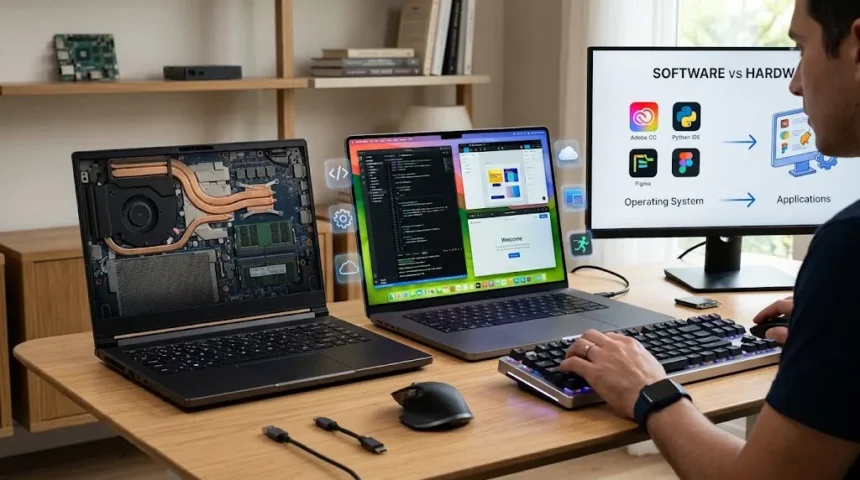
Software vs Hardware: Differences With Easy Examples
Software and hardware are two of the most important concepts in computing, yet they are often confused because they work so closely together. Hardware refers to the physical parts of a computer or electronic device that you can touch, such as the keyboard, monitor, processor, memory modules, and storage drive. Software refers to the instructions, programs, and digital systems that tell that hardware what to do. A laptop without software would be little more than a collection of electronic components, while software without compatible hardware would have nowhere to run. Understanding the difference between software and hardware makes it easier to troubleshoot devices, choose technology, and understand how computers actually work. The relationship between them is simple once you look at practical examples.
Everyday devices demonstrate this relationship clearly. The smartphone in your hand is hardware, but the operating system, messaging apps, camera software, and games running on it are software. A printer is hardware, while the printer driver that helps your computer communicate with it is software. Even cloud services ultimately depend on physical servers, networking equipment, and storage systems somewhere in a data center. In modern computing, hardware has become faster, smaller, and more specialized, while software has become more intelligent, connected, and automated. Both continue evolving together because improvements in one often create new possibilities for the other. This guide explains software vs hardware in straightforward terms, shows easy examples, compares their characteristics, and helps you understand how both parts work together.
What Is Hardware?
Hardware refers to the physical components that make up a computer, smartphone, server, network, or other electronic system. These are the parts that can be physically handled, installed, replaced, damaged, repaired, or upgraded. Common computer hardware includes the motherboard, central processing unit, memory, storage drive, keyboard, mouse, monitor, graphics card, and power supply. A smartphone also contains hardware such as its processor, battery, camera sensors, display, speakers, and wireless antennas. Even cables and connectors can be considered hardware because they are physical components used by the system. Hardware provides the physical foundation that allows software instructions to be processed and converted into useful actions.
The central processing unit, or CPU, is one of the most important hardware components in a computer. It performs calculations, processes instructions, and coordinates many of the tasks required by applications and the operating system. Modern processors contain billions of transistors and can perform enormous numbers of operations every second. Different processors are designed for different purposes, including desktop computers, laptops, servers, smartphones, and embedded systems. CPU performance can affect how quickly software opens, processes information, and completes demanding tasks. However, processor speed is only one part of overall system performance. Memory capacity, storage speed, graphics hardware, cooling, and software optimization can all influence how responsive a device feels.
Memory and storage are also major types of hardware, although they serve different purposes. Random access memory, or RAM, temporarily stores information that programs need while they are actively running. More RAM can help a computer handle multiple applications and larger workloads without relying heavily on slower storage. Storage devices such as SSDs and hard drives retain files even after the computer is powered off. Modern solid-state drives can load applications and files much faster than traditional mechanical hard drives. Smartphones, tablets, and embedded systems use different forms of flash storage for the same basic purpose. Both RAM and storage are physical components, but the way software uses them determines how effectively their capacity contributes to performance.
Input and output devices are another category of computer hardware. Input hardware allows users or other systems to send information into a computer, while output hardware presents results. Keyboards, mice, microphones, scanners, cameras, and touchscreens can function as input devices. Monitors, speakers, printers, and projectors are common output devices. Some components perform both functions, such as a touchscreen that displays information while also detecting finger input. Network interfaces can also send and receive data, allowing computers to communicate with other devices. Understanding input and output hardware is useful because many everyday computing problems involve the connection between a physical device and the software responsible for controlling it.
Hardware eventually wears out, becomes outdated, or experiences physical failure. A hard drive can fail mechanically, a battery can lose capacity, a cooling fan can stop spinning, or a motherboard component can become damaged. Hardware can also become obsolete when newer software requires more processing power, memory, or specialized features than an older device provides. In many computers, certain components can be upgraded without replacing the entire system. Adding RAM, installing a faster SSD, or upgrading a graphics card can extend the useful life of a desktop. Other devices, particularly thin laptops and smartphones, may have more tightly integrated hardware that is difficult to replace individually. Physical limitations therefore make hardware management different from software management.
What Is Software?
Software is the collection of programs, instructions, data, and digital processes that tell hardware how to perform tasks. Unlike hardware, software does not exist as a physical component you can touch. It is stored digitally on devices and executed by processors when needed. Operating systems, web browsers, games, productivity applications, messaging platforms, database systems, and mobile apps are all examples of software. When you open a document editor, the software instructs the processor, memory, storage, display, and input devices to work together. Software therefore acts as a layer of logic that transforms general-purpose hardware into a tool for specific activities. The same physical computer can perform thousands of different jobs simply by running different software.
System software manages the fundamental operation of a computer or device. The most familiar example is the operating system, which coordinates hardware resources and provides a platform for applications. Windows, macOS, Linux, Android, and iOS are operating systems that manage processes, memory, storage, devices, users, and security. Without an operating system or comparable low-level software, most modern computers would be difficult for ordinary users to operate. System software also includes utilities, device drivers, firmware-related tools, and other programs that support core functionality. These programs often operate in the background rather than being opened directly by users. Their reliability is important because application software depends on them to access hardware safely and consistently.
Application software is designed to help users perform specific tasks. Word processors allow people to create documents, spreadsheets support calculations and data analysis, browsers provide access to websites, and editing programs help professionals work with photographs or video. Business applications can manage accounting, customer relationships, inventory, human resources, and other operations. Games, streaming platforms, social media apps, and communication tools are also forms of application software. Applications can be installed locally or accessed through a web browser as cloud-based services. The interface may look simple to the user, but the software can contain millions of lines of code and interact with numerous services behind the scenes. Application software represents the part of computing most people interact with directly every day.
Programming software helps developers create, test, debug, and maintain other software. Code editors, integrated development environments, compilers, interpreters, debuggers, version-control tools, and build systems all fall into this broad category. A developer may write instructions in a programming language such as Python, Java, C++, or JavaScript. Different tools then translate, interpret, package, or execute those instructions so hardware can ultimately process them. Software development also involves libraries, frameworks, APIs, and testing tools that simplify the creation of complex applications. Modern development environments may run locally, in the cloud, or across both. Although users rarely see this layer directly, programming software is responsible for creating almost every application and digital service they depend on.
Software can be updated much more easily than hardware because changing instructions does not necessarily require replacing physical components. Developers can release security patches, bug fixes, performance improvements, and new features through downloads or automatic updates. However, software can still become outdated or unsupported. An old operating system may no longer receive security updates, while an application may stop working with newer hardware or operating systems. Software can also contain defects, configuration problems, malware, or compatibility issues that affect system behavior. These problems are fundamentally different from a physically damaged component. Distinguishing between software failure and hardware failure is therefore an important troubleshooting skill because the solution may involve either changing code and settings or repairing physical equipment.
Software vs Hardware: The Main Difference
The simplest difference between software and hardware is that hardware is physical while software is digital. You can physically touch a keyboard, processor, monitor, SSD, or smartphone because each is made from materials and electronic components. You cannot physically touch a web browser, operating system, mobile app, or game because these exist as digital instructions and data. Software is stored on hardware and executed by hardware, but the two remain distinct concepts. This basic distinction explains many of the other differences between them. Hardware has physical dimensions, manufacturing costs, electrical requirements, and wear, while software is created through programming, distributed digitally, and changed through updates.
Hardware is manufactured, whereas software is developed. Producing hardware involves designing electronic circuits, sourcing materials, creating components, assembling products, testing physical units, and shipping them to customers. Software creation involves planning features, writing code, testing applications, fixing bugs, and releasing digital versions. Making another copy of a physical laptop requires additional materials and manufacturing, while distributing another copy of software can often be done digitally at extremely low incremental cost. This difference shapes how hardware and software companies operate economically. Hardware businesses must manage factories, supply chains, inventory, logistics, and physical repairs. Software businesses focus more heavily on development teams, cloud infrastructure, licensing, updates, customer support, and digital security.
The way hardware and software fail is also different. Hardware problems may involve broken connectors, overheating, failed storage devices, damaged screens, dead batteries, or defective memory. Software problems can involve crashes, bugs, corrupted files, misconfigured settings, outdated drivers, compatibility issues, or malware. Sometimes the symptoms overlap, which makes troubleshooting challenging. A computer that freezes could have faulty RAM, an overheating processor, a damaged SSD, a driver problem, or a software bug. Technicians usually isolate possible causes systematically rather than guessing. Checking error messages, system logs, temperatures, diagnostic results, and behavior under different conditions can help determine which layer is responsible. Understanding the difference between physical and digital failure makes the troubleshooting process much more efficient.
Upgrading hardware generally requires installing or replacing a physical part, while upgrading software usually involves installing a newer version or changing configuration. A user might upgrade hardware by adding more memory or replacing an old hard drive with an SSD. The same user might upgrade software by installing a newer operating system or updating an application. Hardware upgrades are limited by physical compatibility, connectors, power requirements, and the design of the device. Software upgrades are limited by operating-system compatibility, hardware requirements, licensing, and other dependencies. Sometimes a software upgrade creates the need for better hardware because the new program requires more resources. In other cases, hardware upgrades provide little benefit until software is optimized to use them effectively.
Hardware and software also have different lifecycles. Physical equipment may remain useful for years if it continues meeting performance and reliability requirements. Software can change frequently, with applications receiving updates every few weeks or even continuously through cloud deployment. A five-year-old monitor may function almost exactly as it did when purchased, while the browser running on the connected computer may have received dozens of major updates. Security concerns make software updates particularly important because vulnerabilities can be discovered long after release. Hardware can have security vulnerabilities too, especially in firmware or processor design, but physical replacement cycles are generally slower. Organizations therefore need separate strategies for managing hardware assets and software versions throughout their operational lives.
Easy Examples of Hardware and Software
A laptop provides one of the easiest examples of hardware and software working together. The laptop itself contains physical hardware such as the display, keyboard, touchpad, battery, CPU, RAM, SSD, motherboard, Wi-Fi adapter, and speakers. When you press the power button, software stored on the internal drive begins loading and tells the hardware how to start operating. The operating system then presents the desktop, manages applications, and communicates with peripherals. Opening a browser launches additional software that uses memory, processor time, graphics hardware, and network connectivity. The laptop cannot provide these functions through hardware alone. Likewise, the software would be useless without a physical device capable of executing its instructions.
A smartphone illustrates the same concept in a more compact form. Its touchscreen, cameras, battery, processor, microphone, speakers, vibration motor, storage, and sensors are all hardware components. The mobile operating system is software that coordinates those components and allows applications to run. When you open the camera app, software sends instructions to the camera sensor, image processor, storage system, and display. When you make a phone call, software works with the microphone, speaker, cellular modem, and network. Apps can also access GPS, accelerometers, Bluetooth, or biometric sensors with appropriate permissions. Each feature therefore combines physical components with software logic. A broken camera sensor represents a hardware problem, while a camera app that crashes may represent a software problem.
A printer offers another straightforward example. The printer itself is hardware because it contains physical rollers, motors, print heads or laser components, trays, electronics, and network interfaces. The document you send to the printer is processed by software on the computer. A printer driver helps translate operating-system instructions into commands the specific printer understands. If the printer has ink and paper but the driver is missing, the computer may be unable to communicate with it correctly. Conversely, perfect printer software cannot produce a page if the physical print mechanism is damaged. Modern printers also contain embedded software and firmware that manage internal functions. This shows how closely hardware and software can be integrated even in devices that appear mechanically simple.
Gaming systems provide another useful comparison. A gaming PC may contain a high-performance graphics card, fast processor, substantial RAM, SSD storage, gaming monitor, keyboard, mouse, and controller. These are hardware components designed to provide sufficient processing power and responsiveness. The game itself is software, as are the graphics drivers, operating system, game launcher, and voice-chat application. A new graphics card can improve performance, but only if the game and drivers can use its capabilities effectively. Developers may also release software updates that improve frame rates without any hardware changes. If a game requires more memory than the computer has available, the hardware becomes a limitation. Gaming clearly demonstrates how hardware capability and software optimization combine to determine the user experience.
A smart television also combines both categories. The physical screen, speakers, remote-control receiver, processor, network adapter, and HDMI ports are hardware. The interface used to select streaming services is software, while each streaming app is another software application. Firmware inside the television helps control functions such as display processing and connectivity. A physical HDMI port can fail, which is a hardware problem, while an app that refuses to load after an update is typically a software issue. Manufacturers can improve some television functions through software updates without changing the screen or electronics. They cannot, however, turn an older physical display into a fundamentally different panel technology through software alone. Hardware defines certain physical capabilities, while software determines how intelligently those capabilities are used.
Types of Computer Hardware
Processing hardware performs calculations and executes instructions. The CPU is the primary general-purpose processor in most computers, but modern systems may contain several specialized processors as well. Graphics processing units, or GPUs, handle graphics rendering and increasingly support artificial intelligence, scientific computing, and other parallel workloads. Smartphones include system-on-chip designs that combine CPU cores, graphics, neural processing, memory controllers, and communication functions. Dedicated accelerators may handle machine learning, video encoding, encryption, or other specialized operations. The growing use of specialized chips reflects a broader computing trend toward matching hardware architecture to particular workloads. Software developers can take advantage of these processors through supported frameworks and APIs, allowing applications to perform demanding tasks much faster than using a general-purpose CPU alone.
Storage hardware preserves data for future use. Hard disk drives store information magnetically on spinning platters, while SSDs use flash memory with no moving mechanical parts. SSDs generally provide faster access and lower latency, which makes operating systems and applications feel more responsive. Hard drives remain valuable for high-capacity storage where cost per terabyte is important. External drives, memory cards, USB flash drives, and enterprise storage systems are additional examples of storage hardware. The physical medium affects speed, durability, capacity, power consumption, and cost. Software determines how this storage is formatted, organized, encrypted, and accessed. A drive therefore provides raw physical capacity, while file systems and applications turn that capacity into usable documents, databases, photos, videos, and other information.
Networking hardware allows devices to communicate. Routers connect networks and direct traffic between them, while switches connect devices within local networks. Wireless access points provide Wi-Fi connectivity, and network interface cards allow computers to send and receive network data. Modems connect homes or businesses to certain types of internet service. Enterprise networks may also include firewalls, load balancers, gateways, and specialized security appliances. These physical devices depend heavily on configuration software and firmware. A router with incorrect settings can fail to provide internet access even when the hardware itself is functioning perfectly. Network troubleshooting therefore frequently involves checking both physical connections and software configuration. Modern networking illustrates how difficult it can be to separate hardware operation completely from software control.
Peripheral hardware extends what a computer can do. Keyboards, mice, webcams, microphones, scanners, printers, drawing tablets, game controllers, and external monitors are all peripherals. Some connect through USB or Thunderbolt, while others use Bluetooth, Wi-Fi, or specialized wireless technologies. The operating system typically needs a device driver or built-in software support to communicate with each peripheral. Plug-and-play technology has made this process much easier for ordinary users because many devices configure automatically when connected. However, compatibility problems still occur. A new peripheral may not work with an old operating system, or advanced features may require special software from the manufacturer. Physical compatibility and software compatibility must therefore both be considered when purchasing computer accessories.
Power and cooling components are also essential hardware even though they do not directly create files or run applications. Power supplies convert electricity into the voltages required by internal computer components. Laptop batteries store energy so devices can operate away from electrical outlets. Cooling fans, heat sinks, liquid-cooling systems, and thermal materials remove heat produced by processors and other components. If cooling fails, hardware may reduce performance automatically or shut down to prevent damage. Software can monitor temperatures and control fan speeds, creating another example of physical and digital systems working together. Reliable computing depends on these supporting components just as much as on processors and memory. A powerful CPU cannot deliver sustained performance if the cooling system cannot handle the heat it produces.
Types of Software
Operating systems are among the most important types of system software. They manage hardware resources while providing a stable environment in which applications can run. The operating system allocates processor time, manages memory, organizes files, controls user accounts, handles network connections, and coordinates input and output devices. It also provides security mechanisms that restrict which applications can access sensitive data or hardware features. Desktop, mobile, server, and embedded operating systems are designed for different environments. A server may prioritize reliability and remote administration, while a smartphone operating system focuses heavily on battery efficiency, touch interaction, and application permissions. Despite these differences, all operating systems perform the fundamental task of connecting software applications with underlying hardware resources.
Device drivers are specialized software components that help operating systems communicate with particular hardware. A graphics driver translates application requests into instructions supported by a graphics processor. Printer drivers help computers produce output using different printer models. Audio drivers manage communication with sound hardware, while network drivers support Ethernet or wireless adapters. Modern operating systems include many common drivers automatically, which is why most hardware works immediately after installation. However, specialized devices may require drivers supplied by their manufacturers. Outdated or incompatible drivers can cause crashes, poor performance, missing features, or devices that are not recognized. Updating a driver can sometimes solve what initially appears to be a hardware failure, demonstrating the importance of checking both physical and software layers.
Productivity and business applications form another major software category. Document editors, spreadsheets, presentation tools, accounting platforms, customer relationship management systems, project-management tools, and collaboration applications help people complete workplace tasks. Some are installed on local computers, while others operate primarily through web browsers. Cloud-based software has become increasingly common because it allows users to access services from multiple devices without managing every application locally. However, cloud applications still depend on software running on remote servers and hardware operating in data centers. Subscription models have also changed how organizations acquire software. Instead of purchasing one permanent version, businesses may pay ongoing fees for continuously updated services. Software delivery models can change without altering the basic distinction between digital instructions and physical hardware.
Security software helps protect devices, networks, applications, and information. Antivirus tools can detect certain malicious programs, while endpoint security platforms may monitor files, processes, network behavior, and suspicious activity. Firewalls can be implemented as software, hardware, or a combination of both. Encryption tools protect information by making it unreadable without the correct key. Identity and access management software controls who can use particular systems or data. Backup applications automatically create copies of important files and systems so they can be recovered after accidental deletion, hardware failure, or cyberattack. Security software cannot eliminate every risk, especially when systems are poorly configured or outdated. Effective cybersecurity therefore combines software protection, secure hardware, user practices, access controls, monitoring, and regular updates.
Entertainment and creative software includes games, streaming applications, music production programs, video editors, photo editors, 3D modeling tools, and digital illustration platforms. These applications often place heavy demands on hardware because processing large graphics, video, audio, and interactive environments requires substantial computing resources. A professional video-editing program may use the CPU, GPU, RAM, storage, display, and specialized media engines simultaneously. Software developers optimize applications to take advantage of newer processors and graphics features. This creates an ongoing relationship between advances in hardware and advances in creative software. More powerful graphics cards make sophisticated visual effects possible, while new software encourages users to purchase faster hardware. The two industries continuously influence each other’s development.
How Hardware and Software Work Together
A computer performs useful work only when hardware and software cooperate. Consider what happens when you open an application by clicking its icon. The mouse or touchscreen detects physical input and sends that information through hardware controllers. The operating system interprets the input and identifies which application should open. Data for the application is read from the storage device into memory, and the processor begins executing program instructions. The graphics hardware helps render the interface, which appears on the monitor. Every stage involves communication between software instructions and physical components. What feels like a single click from the user’s perspective actually triggers a coordinated chain of operations across several layers of technology.
When you type a document, the same relationship continues. The keyboard detects each key press and sends a signal to the computer. The operating system and application software interpret that signal as a character and store the information in memory. The display hardware shows the letter on the screen while graphics software determines how the character should appear. When you save the document, the application asks the operating system to write the file to storage hardware. If you later print it, printer software and hardware become involved as well. None of these individual components can complete the entire task alone. Computing works because standardized interfaces allow many specialized hardware and software elements to cooperate almost instantly.
Performance also depends on how effectively software uses available hardware. An application designed to use multiple processor cores can complete certain workloads faster than software limited to one core. Video software optimized for GPU acceleration can process effects much more quickly than software relying entirely on the CPU. Likewise, a modern game can use advanced graphics hardware for realistic lighting and detailed environments. Poorly optimized software may perform badly even on powerful hardware because it does not use resources efficiently. Conversely, excellent optimization cannot fully overcome severe physical limitations. A computer with very little memory or an extremely slow processor will eventually constrain demanding applications. Performance is therefore a combination of hardware capability and software efficiency rather than one specification alone.
Compatibility is another important part of the relationship. Software is usually designed around specific processor architectures, operating systems, memory requirements, graphics features, and other technical assumptions. A program written only for one operating system may not run natively on another. A modern game may refuse to launch if the graphics card lacks a required feature. Similarly, new hardware may require an operating-system version capable of supporting its drivers. Manufacturers publish system requirements to help users determine whether their devices can run particular applications. Ignoring these requirements can result in crashes, poor performance, or complete incompatibility. Choosing technology therefore involves checking both whether the hardware is powerful enough and whether the software supports the physical platform.
Firmware occupies an interesting position between hardware and software. It is software stored on hardware devices and used to control their basic functions. Computers use firmware during startup, routers use it to manage networking functions, and SSDs contain firmware controlling how data is stored and retrieved. Cameras, televisions, printers, and countless other electronic devices also depend on firmware. Manufacturers can sometimes fix hardware behavior or add features through firmware updates without physically changing the device. However, an interrupted or incorrect firmware update can occasionally make equipment unusable. Firmware demonstrates that the boundary between hardware and software is conceptually clear but operationally interconnected. Physical devices increasingly rely on embedded software for even their most fundamental behavior.
Hardware Problems vs Software Problems
Hardware problems often produce physical or persistent symptoms that remain even when software changes. A damaged screen may show cracks, dead areas, flickering, or discoloration regardless of which application is open. A failing hard drive can make unusual noises, produce read errors, or disappear entirely from the system. Defective RAM may contribute to crashes, corrupted data, or unpredictable errors. Overheating can cause sudden shutdowns or performance throttling under heavy workloads. Loose cables and damaged connectors can prevent peripherals from being detected. Diagnostic tools can help identify these problems, but physical inspection is also important. If a component remains faulty after software has been reinstalled or settings have been reset, hardware becomes a stronger suspect.
Software problems often appear after an update, installation, configuration change, or corrupted file. An application may refuse to open, display error messages, freeze, or behave incorrectly while the rest of the computer continues functioning normally. Malware can also cause unusual system behavior without any physical component being damaged. Operating-system corruption may create broader problems affecting several applications. Restarting the device, updating software, checking configurations, reinstalling applications, or restoring files can sometimes resolve these issues. Error logs are particularly useful because they may identify the program or service causing a failure. Software troubleshooting usually begins with changes that are reversible before more drastic steps such as reinstalling an entire operating system are considered.
Some symptoms can come from either category. Slow performance is a good example because insufficient RAM, an aging hard drive, overheating hardware, malware, too many background applications, or poorly optimized software can all make a computer feel sluggish. Wi-Fi problems may result from a damaged network adapter, weak physical signal, outdated drivers, incorrect configuration, or router software issues. A blue screen or system crash can result from defective hardware or faulty drivers. This overlap explains why guessing from the symptom alone is unreliable. Troubleshooting should instead isolate variables. Testing hardware, monitoring temperatures, checking updates, running diagnostics, and reproducing the problem under controlled conditions can gradually narrow the cause.
Restarting a computer is a common troubleshooting step because many software problems are temporary. Memory can contain corrupted or conflicting states, services can stop responding, and applications can leave resources locked unexpectedly. Restarting clears volatile memory and reloads the operating system and drivers from a known starting state. This cannot physically repair a damaged battery, broken screen, or failed SSD, which is why persistent problems after a restart may require deeper investigation. However, a successful restart does not prove hardware is healthy either. Intermittent hardware faults can temporarily disappear before returning later. Troubleshooting works best when observations are recorded and patterns are considered rather than relying on one quick test.
Professional repair may be appropriate when a computer contains important data, shows signs of electrical damage, repeatedly shuts down, or has a suspected storage failure. Continuing to use failing storage hardware can increase the risk of permanent data loss. Likewise, users should avoid opening devices containing hazardous power components unless they have appropriate expertise. Software problems can often be handled remotely or through guided troubleshooting, while hardware repairs may require physical access to the device. Keeping reliable backups reduces the consequences of both categories of failure. A backup cannot stop hardware from breaking or software from becoming corrupted, but it can preserve important files while the underlying system is repaired or replaced.
Can Hardware Work Without Software?
Hardware can exist without application software, but most computing hardware cannot perform useful everyday tasks without some form of software or firmware. A processor is physically capable of performing operations, yet it needs instructions describing what calculations to execute. A storage drive can hold electrical or magnetic states, but software determines how those states represent files and directories. A monitor can illuminate pixels, but it needs a signal telling it what image to display. Even very simple electronic devices often contain embedded firmware that controls their operation. This means hardware provides capability while software provides instructions. A computer with no usable operating system may power on successfully but still be unable to perform the functions most users expect.
Some hardware performs limited functions through built-in circuitry without a traditional operating system. A basic electronic calculator, for example, contains physical circuits that perform arithmetic operations based on button input. Yet even many modern calculators include embedded firmware that determines how those functions behave. Appliances, vehicles, routers, cameras, and industrial machines increasingly contain embedded processors running software. The growth of smart devices has therefore made software essential in products that were once mostly mechanical. A washing machine can use sensors and software to control water levels, temperature, timing, and motor speed. The physical machine still does the washing, but software determines how each stage operates. Hardware-only systems have become less common as digital control expands.
A computer can technically start certain low-level processes before a full operating system loads because firmware initializes basic hardware. The firmware checks components, prepares memory, identifies storage devices, and locates software that should run next. This startup process is sometimes visible through a manufacturer logo or firmware settings screen. If no bootable operating system exists, the computer may display an error even though most of its physical parts are healthy. Installing an operating system then transforms the same hardware into a usable general-purpose machine. This example clearly demonstrates that functioning hardware and usable computing are not identical concepts. Physical equipment must receive appropriate instructions before it can perform meaningful high-level tasks for the user.
Specialized hardware can sometimes perform one narrow function with minimal software involvement. Simple logic circuits, analog electronics, and dedicated chips may implement behavior directly in hardware. However, modern systems increasingly use programmable components because software makes behavior easier to update and customize. A manufacturer can change a software-controlled feature through an update instead of redesigning an entire circuit board. This flexibility reduces development time and can extend product functionality after release. The trade-off is greater dependence on software quality and cybersecurity. A mechanical device cannot usually be hacked remotely, while a software-controlled connected device can potentially contain vulnerabilities. Combining hardware with software creates powerful flexibility but also introduces additional layers that need maintenance.
The practical answer is therefore that modern hardware usually depends on some form of software to deliver its intended value. The dependency can range from tiny embedded instructions to sophisticated operating systems and cloud platforms. Users rarely notice this because manufacturers integrate both parts into a seamless experience. Pressing a button on a television remote feels like a hardware interaction, yet software processes the command and decides what happens. Starting a car may involve dozens of embedded computers communicating through software even though the driver sees mainly physical controls. Modern technology is built around cooperation rather than independence between the two categories. Understanding this relationship makes the difference between hardware and software much easier to remember.
Frequently Asked Questions About Software and Hardware
What is the main difference between software and hardware?
Hardware refers to physical computer components that can be touched, such as a keyboard, processor, monitor, or SSD. Software refers to digital programs and instructions, such as an operating system, browser, game, or mobile app.
What are five examples of hardware?
Common hardware examples include a CPU, keyboard, monitor, hard drive or SSD, and mouse. Other examples include printers, graphics cards, routers, speakers, RAM modules, and smartphones.
What are five examples of software?
Examples of software include operating systems, web browsers, word processors, games, and photo-editing applications. Device drivers, antivirus tools, accounting systems, and mobile apps are also forms of software.
Is an operating system hardware or software?
An operating system is software because it consists of digital instructions that manage hardware resources and allow applications to run. Windows, macOS, Linux, Android, and iOS are common examples of operating-system software.
Can software damage hardware?
Software can sometimes cause hardware to operate improperly, overuse resources, change firmware, or control physical components in ways that contribute to problems, although direct physical damage is less common than software malfunction. Malicious or defective low-level software can present greater risks when it controls power, cooling, firmware, storage, or other hardware functions.